# Use case: Counting Traffic with Object Detection Using TensorFlow Lite
Company: Transport & Mobility Leuven
# Goal
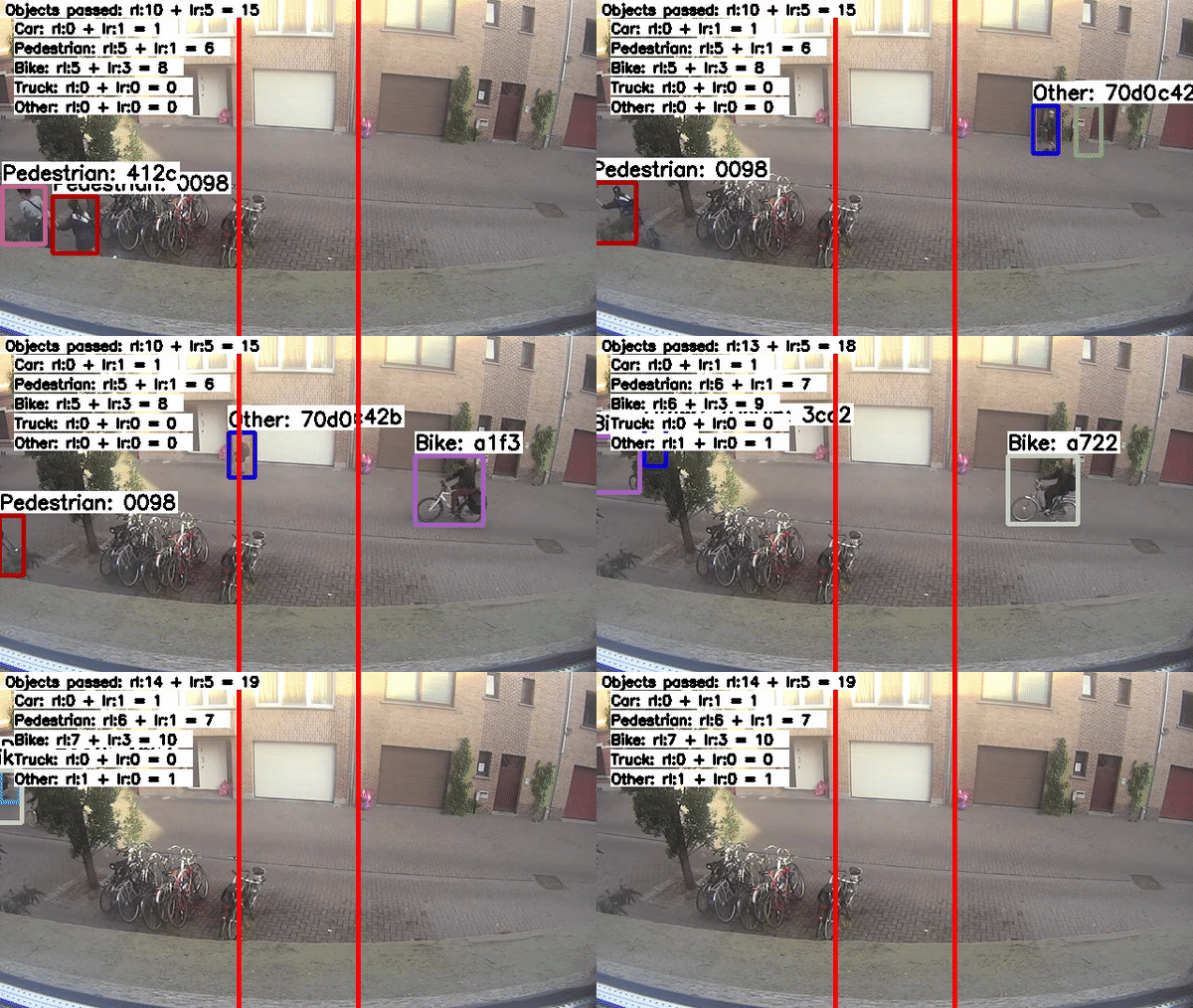
The goal of this project is traffic counting on a Raspberry Pi at home. In addition to counting the passersby, the direction of their movement is also determined.
We divide these road users into five different classes:
- Car
- Pedestrian
- Bike
- Truck
- Other (e.g.: scooter)
This project uses a SSD+MobileNetv2 object detector implemented in TensorFlow Lite complemented with a multiple object tracker from the motpy library.
# Dataset: IMPORTANT INFORMATION
Models should be trained using a balanced dataset!
The provided TFLite models have all been trained on a combination of the provided datasets, which consist of only two (fixed) viewpoints.
To obtain accurate results in all situations, these models have to be trained with more varied data!
It is however adviced to use transfer learning and start from the pre-trained models provided in the official TensorFlow model zoo. We used SSD+MobileNetv2.
For this purpose, our used dataset consisting of 43000 images (RGB, 160x160) and corresponding labels is provided. This dataset has been divided in a training set and a test set. We recommend recording your own data (and labels) and adding this to the dataset to make it more robust and suited to your own situation at home.
Our annotations are provided in PASCAL VOC XML format. This looks something like this:
<?xml version="1.0"?>
<annotation>
    <folder/>
    <filename>frame_000578</filename>
    <path/>
    <source>
        <database>Unknown</database>
    </source>
    <size>
        <width>160</width>
        <height>160</height>
        <depth>3</depth>
    </size>
    <segmented>0</segmented>
    <object>
        <name>Pedestrian</name>
        <pose>Unspecified</pose>
        <truncated>0</truncated>
        <difficult>0</difficult>
        <bndbox>
            <xmin>117.290625</xmin>
            <ymin>47.667057291666666</ymin>
            <xmax>125.28486328124964</xmax>
            <ymax>72.42348293728298</ymax>
        </bndbox>
    </object>
</annotation>
The TensorFlow Object Detection API works with TFRecords. You will have to generate these before you can start training. A script (records.py) based on the official documentation is provided for this purpose in the scripts folder. The labelmap, which can be found in the annotations folder, also has to be provided to this script. This only works with the above mentioned XML format!
# Start Training and Evaluating
Training:
TensorFlow Object Detection API training tutorial
The .config files used for training are provided in the models folder.
Labelmaps (label_map_TML.bptxt) can be found in the annotations folder.
Evaluating:
Evaluation is done with the COCO API. This provides various detection evaluation metrics such as average precision (AP) and average recall (AR)The COCO API works well with the TensorFlow Object Detection API but has to be installed seperately.
Processes can be started using the following commands and correct arguments, pointing to your own directories.
Examples of how to run different parts of the pipeline:

Train:
python model_main_tf2.py --model_dir=models/TML_SSD_MobileNetV2_mix --pipeline_config_path=models/TML_SSD_MobileNetV2_mix/pipeline.config

Metrics:
python model_main_tf2.py --model_dir=models/TML_SSD_MobileNetV2_mix --pipeline_config_path=models/TML_SSD_MobileNetV2_mix/pipeline.config --checkpoint_dir=models/TML_SSD_MobileNetV2_mix

Export graph:
python export_tflite_graph_tf2.py  --pipeline_config_path=./models/TML_SSD_MobileNetV2_mix/pipeline.config --trained_checkpoint_dir=C:\Users\lotte\Documents\TF\workspace\training_demo\models\TML_SSD_MobileNetV2_mix --output_directory=./exported-models/ssd_mobilenetv2_tml_mix_160
# Extra Info on Exporting Models
Trained models have to be exported to the TensorFlow Lite format. A few steps have to be followed to obtain these models.
This is clearly explained in the following tutorial, which we used as a base for our code:
TFLite Object Detection by TannerGilbert
Two scripts have been included in the scripts folder for this purpose:
export_tflite_graph_tf2.py and transform_to_tflite.py
# Models on Raspberry Pi
To run the models on a Raspberry we have provided the TFLite_detection_track.py script is based on this tutorial in the tml_pi_code folder.
How to use this script is best explained in this tutorial:
TFLite Object Detection on Rasbperry Pi by EdjeElectronics.
Modifications to the above mentioned code were made in order to count traffic. Because counting has to be done only once for each object, a tracker is added. This tracker is implemented using the motpy library. Objects are counted when passing through a certain zone to determine their direction.
The tml_pi_code folder contains two models in .tflite format: ssd_mn2_320.tflite and ssd__mn2_160.tflite for a resolution of 320x320 and 160x160 respectively.
# Results
For the 160x160 model, using the COCO API we obtained:
mAP@IoU=0.5:0.95 (COCO mAP) = 0.59
mAP@IoU=0.5 (VOC mAP) = 0.85
Runs at 5 FPS on Raspberry Pi 4 with 4GB RAM.
# Used Set Up on Raspberry Pi
- Raspberry Pi 4 4GB RAM
- Raspberry Pi OS 32-bit version
- Python
- TF Lite interpreter
- OpenCV
- motpy library for multiple object tracking
- NumPy
- labelmap.txt, provided in tml_pi_code folder
Code is run in a virtual environment.
Code can be executed using the TF Lite interpreter.
For this reason it is not necessary to install the full TensorFlow package on the Raspberry Pi.
More information on the lightweight TensorFlow runtime can be found here:
Official TensorFlow Lite guide
# Requirements
Follow tutorial of object detection API:
TensorFlow Object Detection API guide
This tutorial will guide you through the complete installation process of TensorFlow (CPU or GPU, though GPU is advised), the TensorFlow Object Detection API and the COCO API. You may wish to proceed cautiously when installing CUDA and cuDNN as updating your GPU drivers might be required!
We strongly recommend working in a 'container'. Examples of this include, but are not limited to: Conda, Python virtual environment and Docker.
Versions: TF GPU 2.1.0, Python 3.7.9, NumPy 1.17.4, cuDNN 7.6.5, cudatoolkit 10.1.243, CUDA 11.0, COCO API, TF Object Detection API
This description in pdf format can be found here.
# Contact
For more information please contact:
Prof. Toon Goedemé
toon.goedeme@kuleuven.be
dr. ing. Kristof Van Beeck
kristof.vanbeeck@kuleuven.be